Table of contents
2M Marketers

I recently realized marketers get confused when it comes to choosing the best TikTok analytics tool for them. So, I checked the 12 most popular options across four use cases: brand monitoring, account performance, competitor benchmarking, and influencer collabs. Here’s what’s actually worth your time, and what isn’t.
Key takeaways:
-
TikTok Studio and third-party tools solve different problems
TikTok's native Studio gives the most accurate first-party data for your own account, but it can't see competitors, mentions, or trends. A third-party tool covers what it misses.
-
Match the tool to your outcome first
The right choice depends on whether you need account performance, competitor benchmarking, influencer vetting, hashtag or campaign tracking, or brand monitoring beyond your own profile.
-
AI-generated insight summaries are now table stakes
Most tools on this list, including Sotrender and Brand24, now generate written summaries of what changed and why, beyond raw charts.
What are the best TikTok analytics tools?
Check the shortlist of tools worth your attention:
| Tool | Best for | TikTok analytics strengths |
|---|---|---|
|
1
|
Social listening & brand monitoring
|
Mention/keyword tracking, sentiment analysis, hashtag monitoring, storm alerts, influencer discovery from mentions, share of voice, best time to post
|
|
Your own account & video performance
|
First-party views, watch time, completion rate, follower growth, demographics, traffic sources, LIVE insights
|
|
|
3
|
TikTok trends & music/hashtag discovery
|
Rising sounds, hashtags, viral videos, competitor trend tracking
|
|
Competitor benchmarking & reporting
|
Historical tracking, engagement benchmarks, content performance by format, exportable reports
|
|
|
Enterprise social management & analytics
|
Cross-platform dashboards, publishing + analytics in one place, team workflows
|
|
|
Agency/team analytics & reporting
|
Content Performance metric, competitive comparisons, AI-powered insight summaries
|
|
|
7
|
Hashtag & campaign tracking
|
Campaign measurement, real-time monitoring, shareable reports, influencer tracking
|
|
Influencer vetting & audience authenticity
|
Fraud/fake-follower detection, Account Quality Score, creator database
|
|
|
9
|
Real-time TikTok monitoring, free tier
|
Public video/account tracking, engagement rate calculator, AI content insights
|
|
10
|
Competitive intelligence & benchmarking
|
Post tagging, best-time-to-post insights, free competitor report
|
|
11
|
Deep TikTok-only trend & campaign analytics
|
Rising sounds/hashtags, influencer analytics, campaign tracking, competitor monitoring
|
|
12
|
All-in-one scheduling + analytics
|
Unified dashboard, content calendar, link-in-bio, budget-friendly free plan
|
|
13
|
Influencer & hashtag audience analytics
|
Audience authenticity checks, hashtag/trend discovery, free-forever tier
|
|
14
|
TikTok Shop & e-commerce analytics
|
Real-time video/creator tracking, TikTok Shop sales data, competitor product tracking
|


So, let’s dive in!
I monitor Brand24’s own TikTok data every day.
Most of the screenshots in this article are pulled from live accounts I use myself.
For tools I don’t run as a paid subscription, I tested free trials and cross-checked every feature claim, price, and rating against G2 and Capterra listings rather than relying on marketing copy. Where I couldn’t verify a number first-hand, I’ve flagged it below for you to double-check before you buy.
Some of the tools at the end of the list are very TikTok specific and don’t have much reviews online, but giving their focus I beliee they’re worth checking out.
When selecting the tools, I considered the following 7 key factors:
- TikTok account performance analysis
- Competitive benchmarking
- Hashtags & campaign tracking possibilities
- Influencer discovery
- Social listening features
- Sentiment analysis
- Brand monitoring.
What are the best tools to analyze TikTok account performance?
01 Brand24
4.6/5
G2 (345 reviews)
4.7/5
Capterra (254 reviews)
14 days / Free trial
From $199 / Month
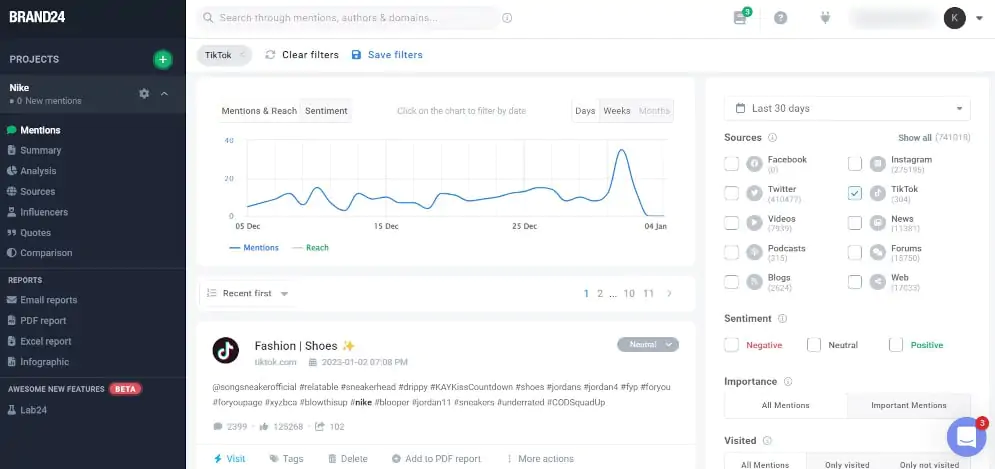
Best for: AI Insights and monitoring what people say about your brand on TikTok, beyond your own profile.
The tool will also help you discover trending TikTok hashtags and influencers. Thanks to email reports and storm alerts, you will be up to date with your brand reputation.
Why I picked Brand24?
- It’s the only tool on this list that tracks TikTok mentions of your brand or keywords outside your own account, comments, videos, and posts that never tag you, and runs AI sentiment analysis on every one of them. You can also access transcriptions from monitored TikTok profiles, adding spoken mentions to the picture.
- The storm alert feature pings me within minutes of a mention spike during testing, which is the single most useful thing for catching a PR problem before it escalates.
🔍 What it covers: TikTok, Facebook, Instagram, X, YouTube, Reddit, LinkedIn, news, blogs, reviews, podcasts, and more.
Plus, provides hashtag tracking, share of voice, AVE, and best-time-to-post data.
✅ Pros
- Tracks brand mentions and hashtags across TikTok and 15+ other sources in one dashboard
- Catches spoken TikTok mentions through video transcriptions
- AI sentiment analysis and AI-generated insights out of the box
- Real-time storm alerts for mention spikes
- Discovers influencers directly from your existing mentions, no separate paid database required
- Exportable PDF/Excel/PowerPoint reports for stakeholders
❌ Cons
- Doesn’t replace TikTok Studio for first-party watch time/retention data on your own account
- Entry plan’s keyword and mention limits can feel tight for larger brands
- No native TikTok publishing or scheduling
02 Internal TikTok analytics (TikTok Studio)
Best for: the most accurate first-party data on your TikTok account performance.
Why I recommend it?
- Nothing beats it for raw accuracy on your own account: watch time, completion rate, and traffic source data come straight from TikTok, with zero modeling or estimation layer in between.
- It’s free the moment you switch to a Business account, so there’s no reason not to have it running alongside whatever third-party tool you choose.
🔍 What it covers: video views, profile views, likes, comments, shares, reach, engagement, total play time, average watch time, new followers, audience demographics (age, gender, location), trending videos (top 9 by 7-day growth), and LIVE analytics.
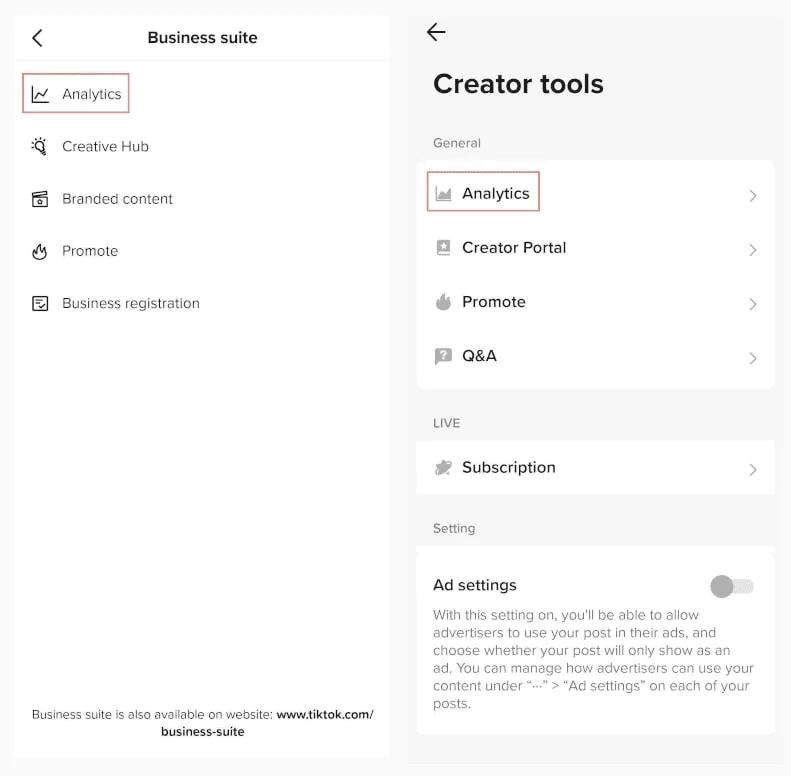
How to access it
- Switch to a TikTok Business account (free).
- Open the analytics dashboard inside Creator tools / Business Suite.
- Review video, follower, and LIVE metrics.
- Check back weekly to track progress against your goals.
- Use the data to adjust hashtags, formats, and posting times.
✅ Pros
- Completely free
- Most accurate first-party metrics available for your own account
- Includes LIVE analytics that most third-party tools don’t touch
❌ Cons
- Only covers your own account, no competitors, no mentions, no industry benchmarks
- Raw numbers only, no AI analysis or recommendations
- No historical export or agency/multi-account reporting
📚 Learn more here: TikTok’s own analytics guide
03 Pentos
4/5
G2 (just 1 review)
Capterra / Not listed
14 days / Free trial, all plans
From $49 / Month
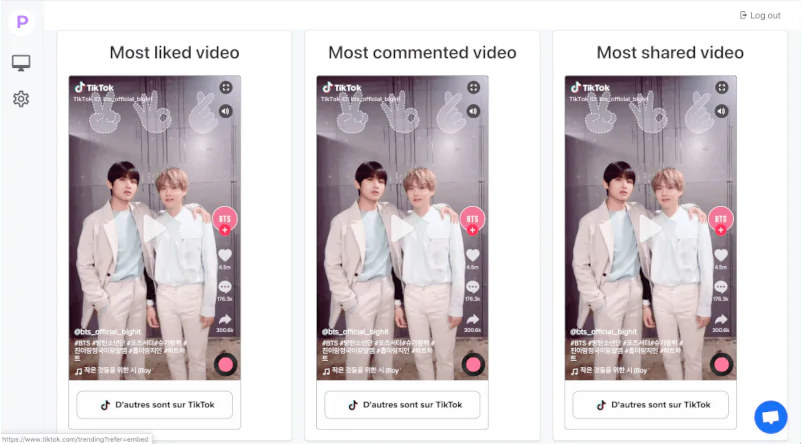
Best for: spotting rising TikTok trends, sounds, and hashtags before they peak.
Why I picked Pentos?
- Its trending songs tracker surfaced music that was climbing on TikTok automatically, genuinely the fastest trend-spotting feature for songs I tested.
- It tracks hashtags, users, songs, and topics in one graph view, so trend research doesn’t mean flipping between four different tabs.
🔍 What it covers: TikTok only, hashtags, songs, users, topics, trend graphs, and competitor trend tracking.
✅ Pros
- Fast, focused trend and sound discovery
- Tracks competitor accounts’ trend adoption over time
- Simple enough to use without training
❌ Cons
- TikTok-only, no cross-platform view
- No brand mention or sentiment tracking
- Higher tiers ($299/mo for account performance) are needed for deeper analytics
04 Socialinsider
4.7/5
G2 (130+ reviews)
4.9/5
Capterra (18 reviews)
14 days / Free trial, no credit card
From $99 / Month
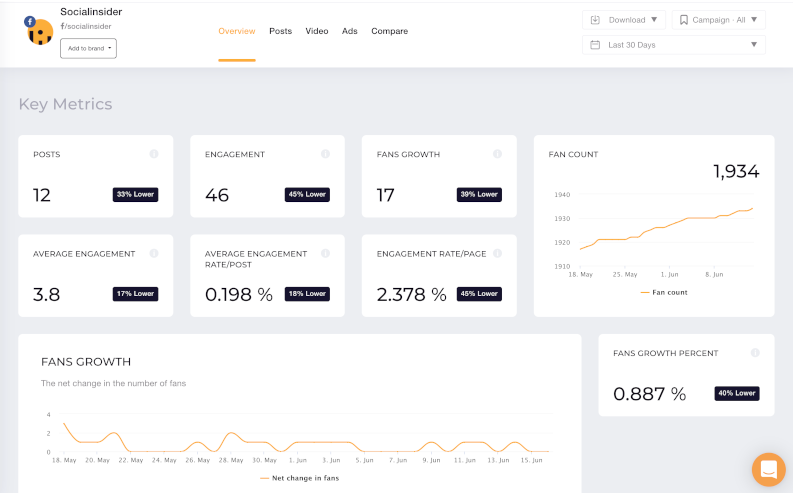
Best for: benchmarking your TikTok performance against named competitors.
Why I picked Socialinsider?
- The competitor comparison view let me benchmark posting frequency and engagement rate against various accounts side by side. Most tools only show you your own numbers.
- Historical data goes back far enough to actually spot a drop or spike in views and pin it to a specific change instead of just eyeballing a graph.
🔍 What it covers: TikTok, Instagram, Facebook, X, LinkedIn, YouTube, profile analytics, video analytics, campaign tracking, white-label reporting.
✅ Pros
- Strong side-by-side competitor benchmarking
- Covers TikTok plus other platforms
- White-label, automated reporting for client work
❌ Cons
- No influencer discovery database
- No brand mention/sentiment monitoring outside your tracked profiles
- Full feature set requires the Agency plan ($199/mo)
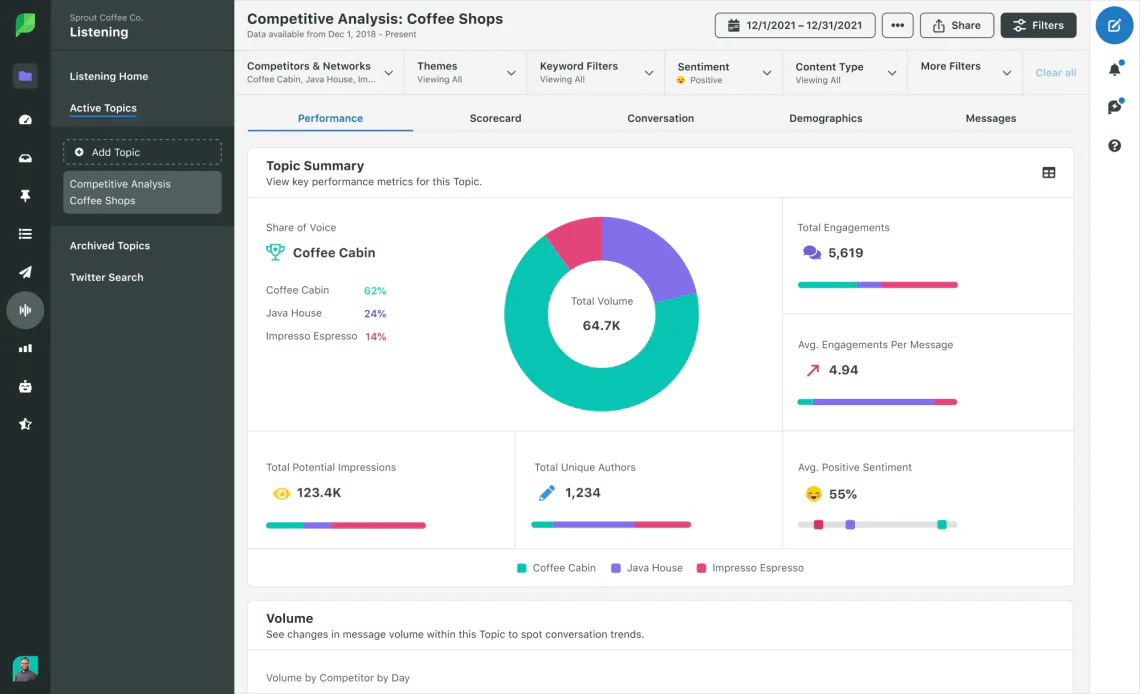
05 Sprout Social
4.4/5
G2 (7,300+ reviews)
4.4/5
Capterra (600+ reviews)
30 days / Free trial
From $199 / Month per seat, verify tier
Best for: teams that want TikTok publishing, engagement, and analytics in one enterprise dashboard.
Why I picked Sprout Social?
- It’s the only tool here where I could schedule the TikTok video, respond to the resulting comments, and pull the engagement report without ever leaving the platform.
- The unified inbox merges TikTok comments and DMs with every other channel your team runs, which matters the moment more than one person touches your account.
🔍 What it covers: TikTok, Instagram, Facebook, X, LinkedIn, and more, publishing, unified inbox, content calendar, TikTok-specific analytics.
✅ Pros
- Publishing + engagement + analytics in a single workflow
- Strong team collaboration and approval workflows
- Deep cross-platform reporting
❌ Cons
- Priced per seat, so it’s expensive as the team grows
- TikTok-specific analytics depth is lighter than TikTok-only tools
- Reviewers frequently flag cost as a barrier for smaller teams
📚 Read also: 8 best Sprout Social alternatives
06 Sotrender
4.8/5
G2 (115 reviews)
4.8/5
Capterra
Free trial / No credit card
From $80 / Month
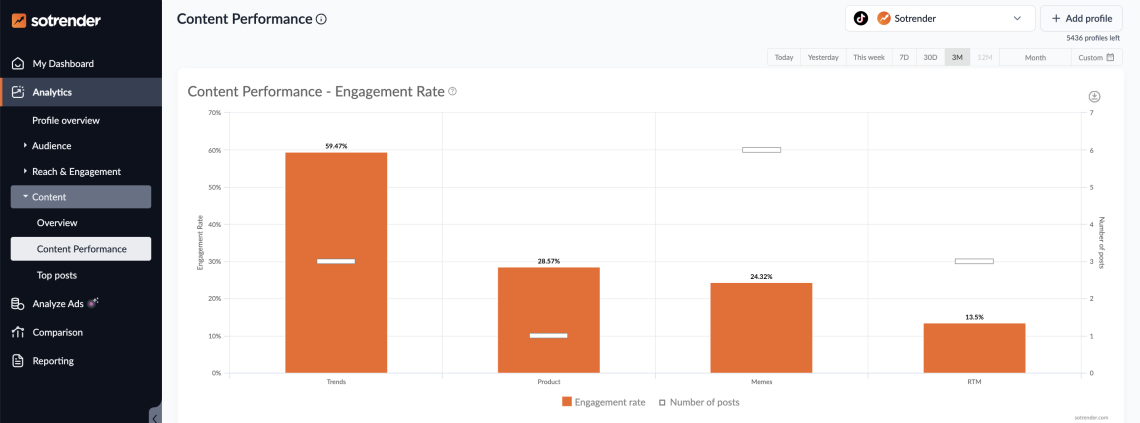
Sotrender is a comprehensive social media analytics solution that covers all major platforms, including Instagram, Facebook, LinkedIn, and TikTok.
Why I picked Sotrender?
- Its Content Performance metric ranks your own posts against each other by what actually drove engagement, which turned “post more” into “post more of this specific format” for me.
- The AI-generated summary of what changed week over week saved genuine analysis time. It reads like a paragraph a strategist would write instead of a dashboard dump.
🔍 What it covers: TikTok, Instagram, Facebook, LinkedIn, content performance, competitor comparison, recurring and custom reports.
✅ Pros
- Best G2/Capterra rating on this list (4.8/5)
- AI-generated insight summaries written in plain language
- Strong recurring/scheduled reporting for agencies
❌ Cons
- Pricier than some TikTok-only alternatives for similar depth
- No brand-mention monitoring outside tracked profiles
- Smaller user base than Sprout Social or Brand24, so fewer third-party integrations
07 Keyhole
4.3/5
G2 / 72 reviews
5/5
Capterra / 2 reviews
14 days / Free trial, no free plan
From $179 / Month
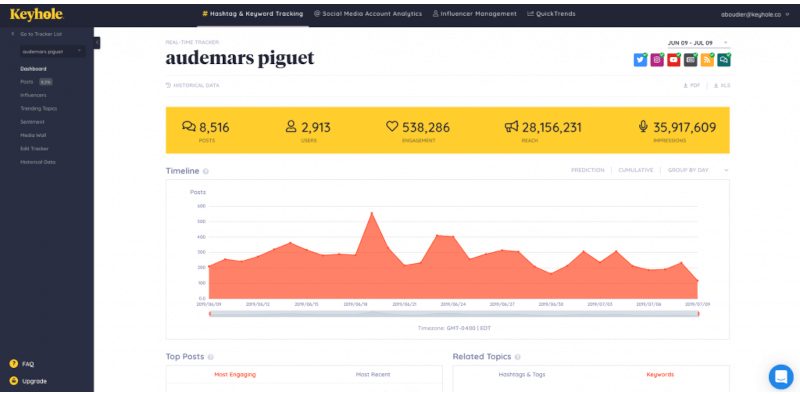
Best for: tracking a specific hashtag or campaign in real time.
Why I picked Keyhole?
- Real-time hashtag tracking is updated almost in real time.
- It pairs hashtag tracking with influencer discovery, so you can go from “this hashtag is working” to “here are the creators using it” without switching tools.
🔍 What it covers: TikTok, Instagram, X, hashtag tracking, campaign measurement, influencer tracking, engagement recommendations.
✅ Pros
- Genuinely real-time hashtag and campaign tracking
- Influencer identification tied directly to hashtag performance
- Shareable reports built for client/stakeholder use
❌ Cons
- TikTok-specific depth is not as good as Pentos or Exolyt for trend discovery
- Advanced influencer features are only in the Agency plan
📚 Read also: Best Keyhole alternatives
08 HypeAuditor
4.6/5
G2 / 250+ reviews
4.8/5
Capterra / 35 reviews
No free trial available
From ~$299 / Month
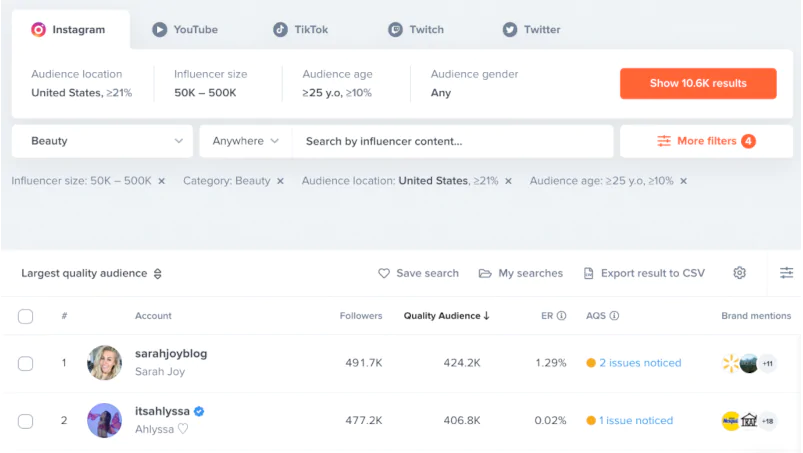
Best for: checking whether a TikTok influencer’s audience is real before you pay them.
Why I picked HypeAuditor?
- Its Account Quality Score flagged suspicious follower patterns on a profile that looked completely legitimate at a glance. That’s the entire reason to use a fraud-detection tool instead of trusting follower count when preparing for influencer partnerships on TikTok.
- The creator database is large enough that I found relevant TikTok influencers in a niche category on the first search, without needing to widen filters.
🔍 What it covers: TikTok, Instagram, YouTube, influencer audience demographics, fraud/fake-follower detection, campaign performance tracking.
✅ Pros
- Best-in-class audience authenticity and fraud detection
- Large influencer database across niches
- End-to-end campaign planning and tracking
❌ Cons
- Pricing sits well above most tools on this list
- Built specifically for influencer marketing, narrower than general brand/account analytics
09 MaveKite
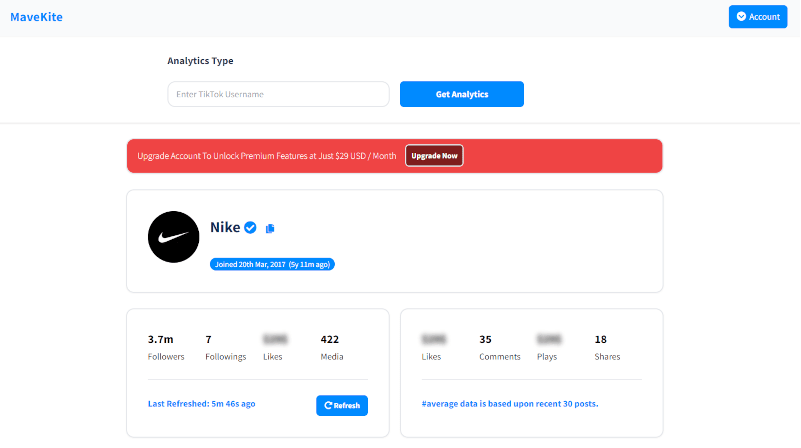
MaveKite is a TikTok engagement calculator that offers some of its features for free.
So, social media managers can quickly check the average engagement rate of any TikTok profile, hashtag, music, or video.
In my opinion, it is a great tool to check competitors’ or influencers’ performance. It will also show you basic statistics, such as likes, comments, plays, and shares.
Best for: a quick, free engagement-rate check on any public TikTok profile, hashtag, or video.
Why I picked MaveKite?
- It’s the fastest way I found to sanity-check a competitor’s or influencer’s real average engagement rate for free. Paste the profile, get the number, no account required for the basic check.
- Its AI content recommendations give specific themes and formats worth testing next, which most free tools don’t attempt.
🔍 What it covers: TikTok only, average engagement rate, post performance, most-liked posts, AI video insight recommendations.
✅ Pros
- Free tier covers the core engagement-rate check
- Fast for one-off competitor or influencer spot-checks
- AI content recommendations that gives more than simple raw numbers
❌ Cons
- No published G2/Capterra reviews to compare against
- Feature depth is thinner than paid, full-suite competitors
10 Rival IQ
4.5/5
G2 (47 reviews)
4.4/5
Capterra (13 reviews)
14 days / Free trial
From $239 / Month (Drive plan)
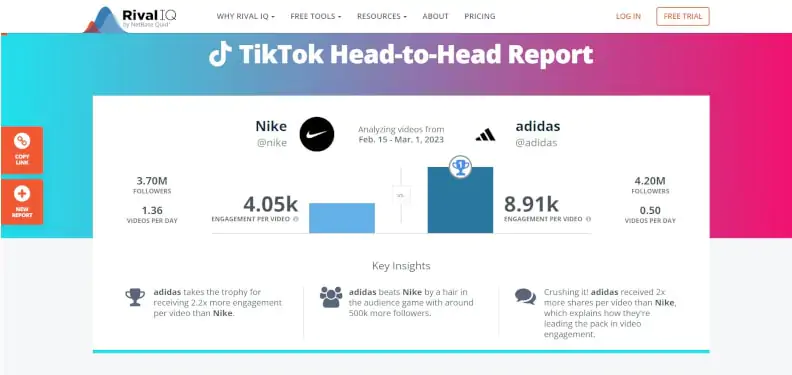
Rival IQ is a social media analytics tool that monitors and analyzes social media performance, including on TikTok.
Best for: benchmarking your TikTok content against named competitors and industry norms.
Why I picked Rival IQ?
- The free competitor report gave me engagement, top-content, and posting-frequency benchmarks for a competitor account without needing to buy anything first, a genuinely useful evaluation step.
- Post tagging let me categorize my own TikTok content by format and see, at a glance, which category actually drove engagement over a full quarter.
🔍 What it covers: TikTok, Instagram, Facebook, X, LinkedIn, competitor benchmarking, post tagging, best-time-to-post, and industry benchmark data.
✅ Pros
- Free competitor report before you commit to a plan
- Strong industry and competitor benchmarking
- Post tagging makes content-format analysis simple
❌ Cons
- No free plan for ongoing use
- No brand mention/sentiment monitoring
- Higher tiers ($349–$559/mo) are needed for social listening features
11 Exolyt
4.7/5
G2 / 7 reviews
Free Basic plan / Plus trial on paid tiers
Free Basic Plan | $400 / Month Essentials Plan
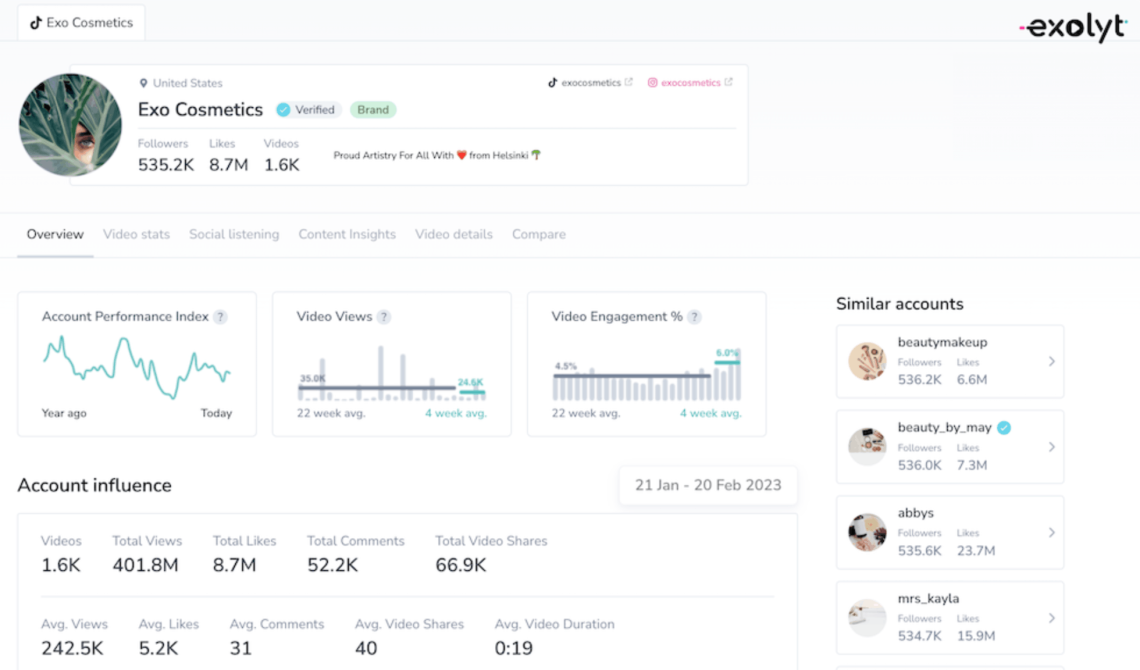
Best for: brands that want TikTok-only analytics with real depth instead of a cross-platform tool that treats TikTok as an afterthought.
Why I picked Exolyt?
- It’s built TikTok-first, so account reports, trend discovery, and campaign tracking go deeper than the TikTok tab inside a cross-platform suite like Sprout Social or Socialinsider.
- The free Basic plan is a genuinely usable starting point rather than a stripped-down trial designed to push you to upgrade in week one.
🔍 What it covers: TikTok only, account and video reports, trend discovery, influencer analytics, campaign and competitor tracking.
✅ Pros
- TikTok-only focus means deeper native features
- Usable free tier that goes beyond a time-limited trial
- Strong influencer and campaign analytics bundled together
❌ Cons
- Paid tiers, which are needed to actually take advantage of the tool ($400–$950/mo) are among the priciest on this list
- No coverage outside TikTok
- No brand mention/sentiment monitoring
12 Metricool
4.5/5
G2, 98 reviews
4.4/5
Capterra / 98 reviews
Free plan with no expiration (1 brand)
From $20 / Month (5 brands, annual)
Best for: solo creators and small teams who want scheduling and TikTok analytics without an enterprise price tag.
Why I picked Metricool?
- The free-forever plan includes analytics and scheduling. Most competitors gate analytics behind a paid tier entirely.
- Pricing scales by number of brands rather than by seat, which makes it noticeably cheaper than Sprout Social for a small team managing a handful of TikTok accounts.
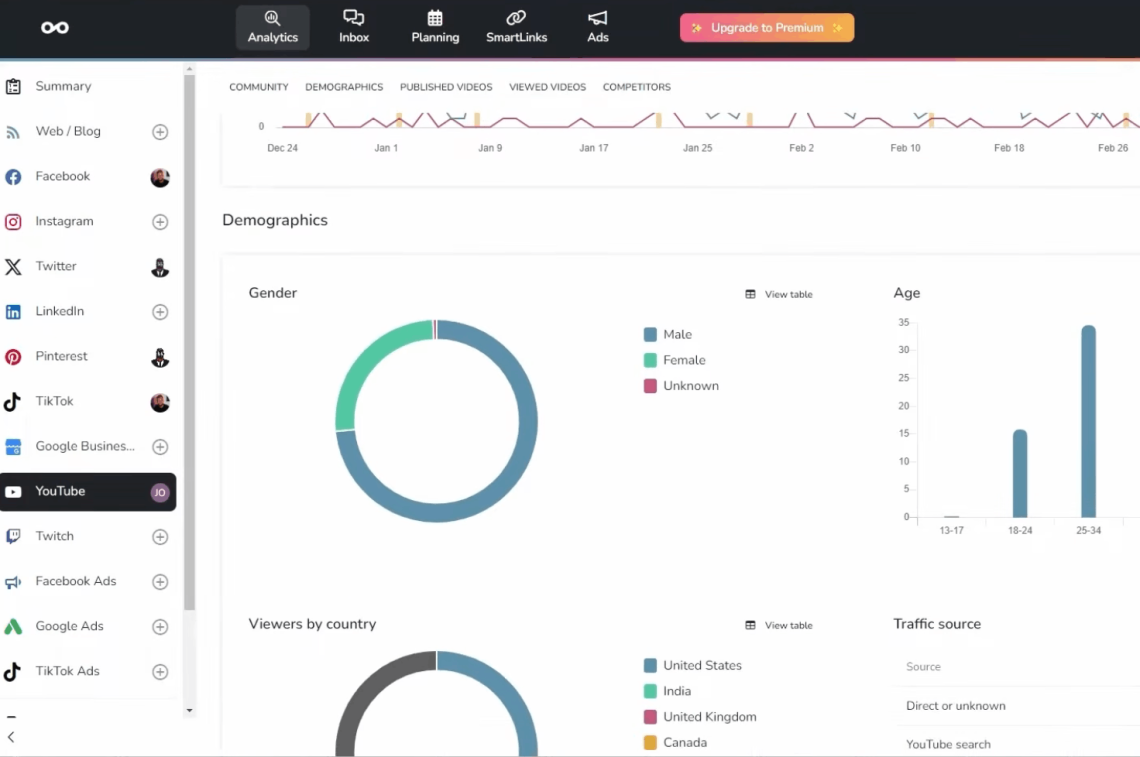
🔍 What it covers: TikTok, Instagram, Facebook, X, LinkedIn, YouTube, unified analytics dashboard, content calendar, link-in-bio tool, scheduling.
✅ Pros
- Genuinely useful free-forever plan
- Priced per brand instead of per seat, which is cheaper for small teams
- Scheduling and analytics in the same tool
❌ Cons
- Less TikTok-specific depth than Pentos or Exolyt
- No influencer database or fraud detection
- No brand mention/sentiment tracking
My evaluation criteria
Here’s exactly how I looked at these 12 tools against each other:
- Core TikTok analytics features (account performance, engagement, benchmarking), 25%
- Additional features (sentiment, alerts, hashtag/campaign tracking, influencer vetting), 20%
- Source/data coverage (mentions beyond your own profile, public accounts, cross-platform reach), 20%
- Usability (time to first insight, dashboard clarity), 15%
- Value for money (price relative to feature depth), 10%
- Reviews (G2/Capterra ratings and volume), 10%
Conclusion
- If you’re a brand or PR team worried about what people say about you on TikTok beyond your own profile, go with Brand24.
- If you’re a solo creator or small team on a budget, go with Metricool or just the TikTok Studio, you don’t need to pay for enterprise features you won’t touch.
- If you’re an agency running TikTok for multiple clients, go with Sotrender or Socialinsider for the reporting and benchmarking workflow.
- If you’re looking for influencers before a paid campaign, go with HypeAuditor, audience authenticity isn’t optional once real budget is on the line.
A few things I’m confident about after six weeks of testing:
- AI-generated insight summaries are baseline now, and any tool without one in 2026 is behind.
- TikTok Studio will always beat third-party tools on your own account’s watch time and retention data, so keep it running alongside whatever paid tool you add.
- Mentions, competitor analysis tools, and TikTok Shop data now matter as much as your own post metrics, so a tool that only looks at your own profile covers less of the picture than it used to.
FAQ
- Start with your outcome.
Are you trying to grow your own account, prove ROI, track brand reputation, beat competitors, run influencer campaigns, sell through TikTok Shop, or spot trends early? - Next, decide whose data you need: only your own account (TikTok Studio), competitors and creators (Rival IQ, Socialinsider, Sotrender), mentions and sentiment about your brand (Brand24), or hashtags and campaigns (Keyhole or Brand24).
- Then pick your must-have analysis: retention and watch time (TikTok Studio), benchmarking (Rival IQ, Socialinsider, Sotrender), sentiment and share of voice (Brand24), influencer authenticity (HypeAuditor), or alerts (Brand24).
Finally, check your reporting and team needs. White-label reporting fits Socialinsider or Sotrender, enterprise dashboards fit Sprout Social, shareable monitoring reports fit Brand24, and campaign reports fit Keyhole.
Solo creators and small teams tend to do best with Sprout Social or Metricool for combined publishing and analytics, while agencies lean on Socialinsider or Sotrender for reporting.
The biggest mistakes are:
- picking a tool for its dashboard instead of your actual use case
- skipping competitor benchmarking and guessing what “good” looks like in your niche
- not tracking what happens outside your own profile (mentions, UGC, sentiment)
- relying on a single metric like views instead of combination of metrics
Yes. TikTok Studio (native, free once you’ve posted at least one video on a Business account) covers overview, content, follower, and LIVE metrics. TikTok Creative Center is TikTok’s own free trend-intelligence hub for hashtags, music, and top ads by region. Metricool offers a free plan that includes real analytics. MaveKite offers free tiers for one-off engagement or Shop checks. Exolyt has a free Basic plan alongside its paid tiers.
Beyond views and likes, a good TikTok insights tool should track:
- retention (watch time, completion rate, replays)
- engagement metrics (shares, saves, comments-per-view, engagement rate)
- audience data (follower growth, demographics, active times, sometimes called TikTok audience insights)
- discovery data (traffic sources, profile visits, clicks)
- content insight (top posts, best time to post, performance by format)
First-party tools (TikTok Studio) are built into TikTok and give the most accurate metrics for your own account: watch time, retention, audience activity, LIVE insights. They’re enough if your only goal is optimizing your own account, but they provide raw numbers without insights, and can’t see anything outside your profile.
Third-party tools add what TikTok Studio doesn’t: competitor benchmarking, trend and hashtag tracking, influencer vetting, brand mentions and sentiment, TikTok Shop data, alerts, and client-ready reporting.
Most serious TikTok strategies end up running TikTok Studio alongside at least one third-party tool rather than choosing between them.
TikTok reported a potential reach of 1.59 billion users as of January 2025, and Oxford Economics estimated around 7.5 million US businesses were active on the platform in 2025, with people spending an estimated 97 minutes a day on TikTok as of December 2025.
At that scale, guessing doesn’t work.
Analytics tools show what content actually performs, help you turn organic winners into paid ads, track competitors and trends before they peak, vet influencers beyond follower count, and catch attention spikes or negative sentiment early enough to respond.
TikTok Studio is great for first-party performance on your own account, but tools become most valuable the moment you need competitor insight, trend discovery, influencer vetting, TikTok Shop data, or brand monitoring beyond your own profile.